Sales Process vs. Salesforce: Which Should Adapt?
"We don't want to change our sales process just to fit Salesforce."
I've heard some version of that statement from sales leaders and business owners many times over the years.
And I understand the sentiment. You've spent years developing a way of selling that works for your business. You've built relationships, established routines and developed processes that your salespeople know and trust.
So why should you change all of that just to accommodate a CRM?
Well, here's my answer.
You're right. You shouldn't change a good sales process simply to fit Salesforce. But you also shouldn't force Salesforce to accommodate a bad one.
That's where the conversation gets interesting.
The real challenge isn't deciding whether your sales process should adapt to Salesforce or Salesforce should adapt to your sales process. It's understanding which parts of your existing process are worth preserving, which ones need improvement, and how Salesforce can best support the way your organization sells.
Let's look at how to get that balance right.
Salesforce Is Designed to Automate Business Processes
At its core, Salesforce is a platform for managing customer relationships and automating business processes.
It provides a structure for managing Leads, Accounts, Contacts, Opportunities, activities, workflows, reporting and much more.
When configured properly, it can make your existing sales processes more efficient, consistent and measurable.
But there's an important condition.
Your underlying business process needs to make sense.
If your sales organization has a well-defined and effective process, configuring Salesforce to support it is usually the right approach.
If your process is inefficient, inconsistent or poorly understood, automating it won't magically make it better.
In fact, you may simply make the existing problems more visible and harder to change.
Consider a sales organization that requires its salespeople to make hundreds of cold calls every week. Salesforce can track the calls, measure activity and report on the number of appointments generated.
But what if the organization discovers that the time and expense associated with that approach are producing very few qualified opportunities?
Salesforce may reveal that the process isn't working as well as leadership assumed.
It won't, by itself, determine the best alternative.
That requires sales leadership to examine the results, consider other approaches and decide whether the process needs to change.
Salesforce can help you understand how well your process is working. It can't make a bad process a good one.
That's an important distinction.
Don't Confuse Your Existing Process With Your Best Process
One of the biggest mistakes organizations make is assuming that because a process has been used for years, it must be the right one.
It may be familiar. It may even produce acceptable results.
But that doesn't necessarily mean it's efficient, scalable or appropriate for the business today.
Before configuring Salesforce, take a hard look at how your sales organization actually operates.
Ask yourself:
Are our salespeople following a consistent process?
Do we know which activities produce the best results?
Are we spending too much time on low-value administrative work?
Are our Opportunity stages aligned with meaningful milestones in the buying process?
Do our managers have the information they need to coach and forecast effectively?
Are we measuring the right things?
These questions help distinguish between processes that should be preserved and those that deserve a rethink.
You don't need to redesign everything just because you're implementing Salesforce. But you should use the opportunity to identify unnecessary complexity, inconsistent practices and activities that aren't delivering enough value.
This is why our Sales Process Consulting approach begins with the way your organization sells, rather than jumping straight into technology.
The objective is to establish a process that works for your business and gives Salesforce something meaningful to support.
Respect the Way Salesforce Is Designed
There's another side to this discussion.
Even when your sales process is sound, that doesn't mean you should configure Salesforce to behave in absolutely any way you choose.
Salesforce has a fundamental data model and a set of standard objects designed to manage common business relationships and processes.
Leads represent potential prospects that haven't yet been qualified or established as customer relationships. Accounts represent organizations. Contacts represent people associated with those organizations. Opportunities represent potential sales.
These standard objects work together to provide a flexible structure for managing sales activity.
Of course, Salesforce also allows considerable customization. You can add fields, create custom objects, modify page layouts, automate processes and build specialized applications.
That flexibility is powerful. But it can also create problems when customization becomes a substitute for thoughtful design.
The fact that Salesforce allows you to build something doesn't automatically mean you should.
I've seen organizations create complicated structures that duplicate functionality Salesforce already provides. I've also seen systems burdened with fields that nobody understands, processes that are difficult to follow and customizations that make routine tasks unnecessarily complicated.
The result is often a system that's harder to maintain, harder to use and more expensive to improve.
Customize Salesforce to support your business requirements, but don't ignore the architecture that makes the platform powerful in the first place.
Case Study 1: When Marketing Creates Opportunities Too Early
Let's look at a real-world example.
One organization we worked with had a small sales team supported by two people responsible for handling incoming Leads.
The company had a strong Lead generation operation. New inquiries came in regularly, and the inside team worked through those Leads before passing them along to the sales representatives.
The problem was how they defined qualification.
Even a relatively minor indication of interest, such as completing a website form, could result in a Lead being converted into an Account, Contact and Opportunity.
The sales representative would then receive an Opportunity even though no meaningful sales conversation had taken place.
Imagine being a salesperson and opening Salesforce to find a long list of Opportunities that you hadn't personally qualified and, in many cases, had never even discussed with the prospect.
You were expected to maintain those records, update close dates, estimate deal values and explain your pipeline to management.
But how could you reasonably forecast deals that weren't yet real sales opportunities?
The company had two problems it wanted to solve.
First, leadership wanted a more accurate forecast.
Second, the sales team had developed a negative attitude toward Salesforce. Maintaining large numbers of questionable Opportunities was creating frustration and unnecessary administration.
The underlying issue wasn't the Salesforce configuration alone. It was the qualification and handoff process.
Our recommendation was to revisit how Leads were being evaluated and passed to sales.
We established clearer qualification criteria and introduced a simple Hot, Warm and Cold classification to distinguish prospects requiring immediate attention from those needing further nurturing.
Hot and Warm Leads could be passed to the sales representatives for follow-up. Cold Leads remained with the inside team for continued nurturing.
Most importantly, the sales representative received a Lead rather than an automatically created Opportunity.
That gave the salesperson the responsibility to determine whether a genuine sales opportunity existed.
The result was a more deliberate conversion process, fewer premature Opportunities and an early improvement in pipeline quality and forecast visibility.
It also gave salespeople more ownership over the Opportunities they were expected to maintain.
The lesson wasn't that every organization should use this exact Lead process.
The lesson was that your qualification process should determine when an Opportunity is created, and Salesforce should support that decision.
The right configuration helped the organization improve its process without abandoning the structure of Salesforce.
Case Study 2: Don't Rebuild Your Old CRM Inside Salesforce
The second example involved a company migrating from Microsoft Dynamics to Salesforce.
The organization had chosen Salesforce because it believed the platform offered advantages for its sales teams, particularly around mobile functionality.
But when it came time to configure the new system, the company made a significant mistake.
Instead of examining how Salesforce could improve its sales processes, it largely recreated the structure of its previous CRM.
That included a large number of Account fields, some of which were poorly understood by the people expected to use them.
The company also used custom fields and objects to replicate functionality that Salesforce already provided through its standard data model.
Perhaps most concerning, it chose to track its sales pipeline through a status field on the Account record while largely ignoring the standard Opportunity object.
This created an unnecessary departure from the way Salesforce is designed to manage sales opportunities.
The problem with this approach is that it carries forward the limitations of the old system while sacrificing some of the advantages of the new one.
If your previous CRM had unnecessary fields, inconsistent processes or an awkward data structure, copying those elements into Salesforce doesn't solve the underlying problems.
It simply gives them a new home.
Of course, there may be legitimate reasons to preserve certain aspects of a previous CRM. Your business may have unique requirements, specialized workflows or integrations that need to be maintained.
But those decisions should be made deliberately, not automatically.
When migrating platforms, ask what the business actually needs today. Evaluate which existing processes are effective, which should be improved and which features of Salesforce can meet those requirements using standard functionality.
A CRM migration is an opportunity to improve how you work, not simply reproduce the system you're leaving behind.
Find the Balance Between Process and Platform
So, where does that leave us?
Your sales process should drive your Salesforce configuration. But your existing process shouldn't be treated as untouchable.
Think of it as a two-way conversation.
Your business defines the outcomes it needs, the way it wants to sell and the information required to manage performance.
Salesforce provides a platform that can support those requirements through its standard functionality, configuration and automation.
At the same time, Salesforce may reveal opportunities to improve the process itself.
For example, a well-designed dashboard might expose a bottleneck in your sales pipeline. A consistent approach to Opportunity stages might reveal that your existing qualification criteria are too loose. Better activity reporting might show that salespeople are spending too much time on low-value tasks.
Those insights can lead to changes in how the business operates.
This is where the relationship between process and platform becomes especially valuable.
You aren't simply adapting one to the other. You're using the strengths of each to improve the overall sales system.
Don't Forget the People Who Have to Use It
There's one more important consideration.
Even a well-designed sales process and a carefully configured Salesforce platform won't deliver much value if your salespeople don't use them consistently.
People need to understand how the new process works, why it matters and what's expected of them.
Sales managers need to reinforce those expectations through coaching, pipeline reviews and day-to-day management.
And salespeople need training that reflects the actual way they'll use Salesforce, rather than generic instruction that leaves them to figure out the business process on their own.
This is why successful Salesforce initiatives need to address more than process and technology.
They also need to address the people side of change.
If you're introducing a new process or significantly changing an existing one, consider how you'll communicate the reasons for the change, prepare your team, support them during the transition and reinforce the new behaviors over time.
Our Salesforce Adoption and Change Management approach focuses on helping organizations make those changes stick.
Because ultimately, the best-designed system in the world isn't going to deliver much value if the people it's designed for don't use it.
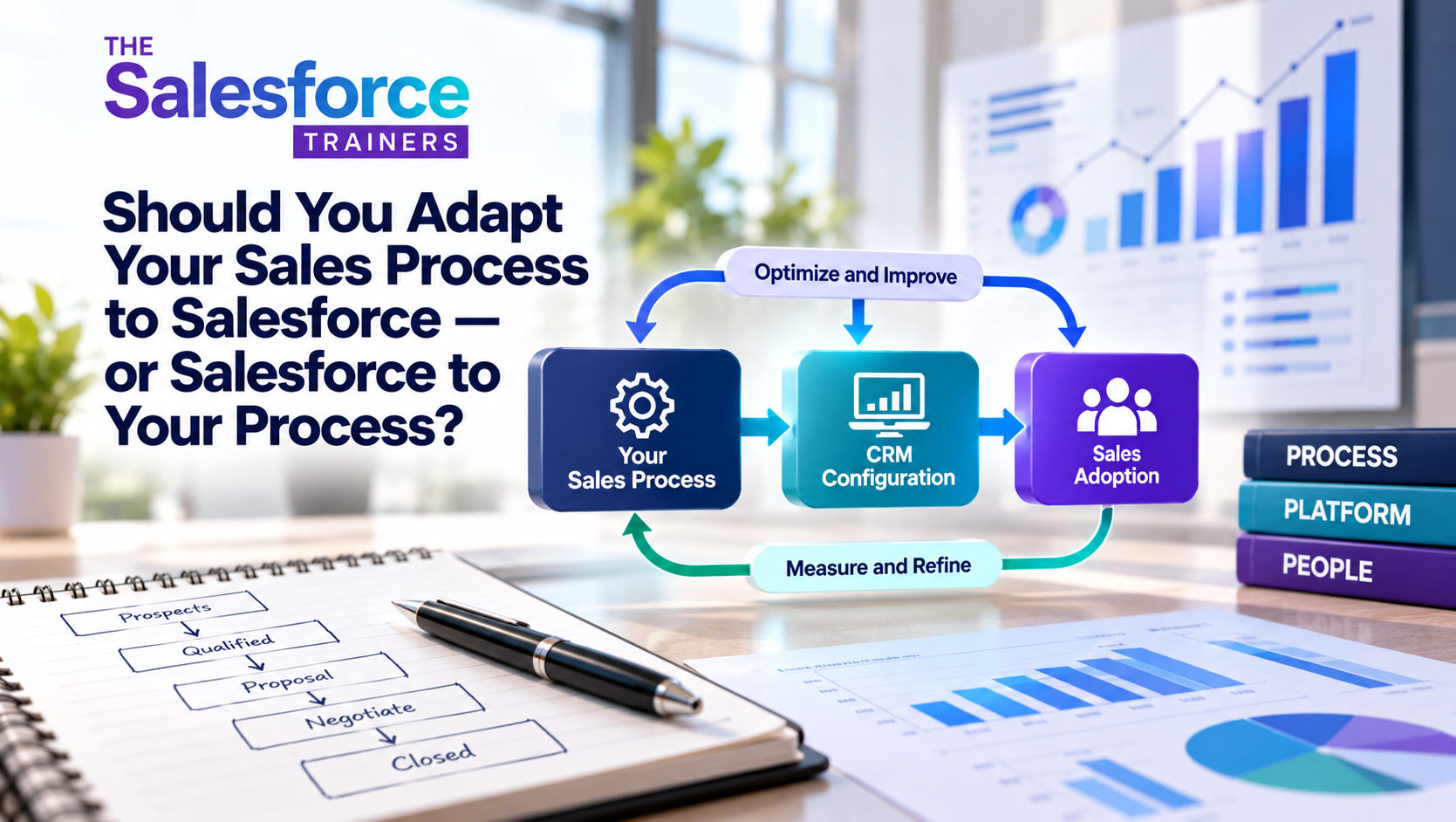
Process, Platform, People: Get the Sequence Right
This brings us to the framework that guides our approach to Salesforce consulting.
Process. Platform. People.
Process: Define how your organization should sell. Identify the activities, milestones, qualification criteria and management practices that support your business objectives.
Platform: Configure Salesforce to support those processes. Use standard functionality wherever practical, customize where necessary and avoid introducing unnecessary complexity.
People: Prepare salespeople and managers to work within the system. Provide relevant training, communicate the reasons for change, build capability and reinforce the behaviors that lead to success.
These three elements are closely connected, but the sequence matters.
Start with the process. Then configure the platform. And involve your people throughout the journey, not just when it's time to deliver training.
That's the foundation of our P3 Framework.
So, Should You Adapt Your Sales Process to Salesforce?
The answer is neither a simple yes nor a simple no.
You should configure Salesforce to support a sales process that's effective, consistent and aligned with your business objectives.
But you should also be willing to challenge that process when the evidence suggests there's a better way to work.
And you should respect Salesforce's underlying architecture rather than rebuilding the platform to imitate old systems or accommodate unnecessary complexity.
The real objective isn't to make your sales process look like Salesforce or make Salesforce look exactly like your sales process.
It's to create a sales system in which the process, platform and people work together.
Don't change a good process just to fit Salesforce. But don't use Salesforce to automate a bad one, either.
Get that balance right, and you'll be in a much better position to realize the value of your CRM investment.