Salesforce Activities Explained: Log a Call vs. New Task vs. New Event
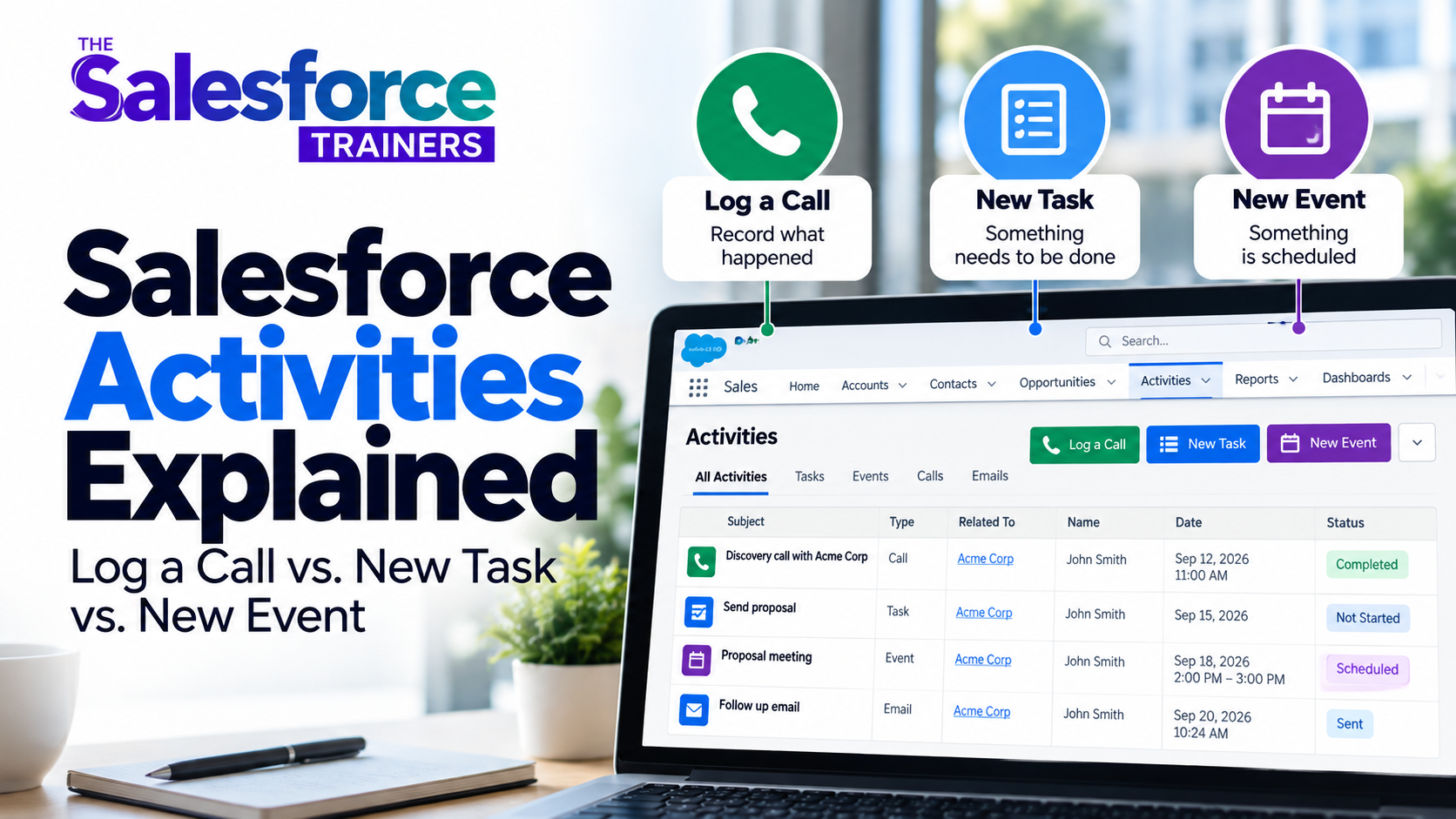
Salesforce Activities are one of the simplest—and most useful—parts of Salesforce.
They allow salespeople to keep track of what has happened with a customer or prospect, what needs to happen next, and what is already scheduled.
The challenge is that Salesforce gives you several different ways to record those activities:
- Log a Call
- New Task
- New Event
So what's the difference?
The simplest way to think about it is this:
Salesforce Activity Use it when...
Log a Call - Something just happened and you want to record it
New Task - Something needs to be done in the future
New Event - Something is scheduled for a specific date and time
Email - You want to send or record an email interaction
Once you understand that distinction, Salesforce Activities become much easier to use.
And when they're used consistently, they can provide salespeople and managers with a much clearer picture of what's happening in the pipeline.
What Are Salesforce Activities?
Salesforce Activities are records of interactions and actions associated with your customers, prospects, and opportunities.
They can tell you two very important things:
What happened?
and
What's going to happen next?
For example:
- You had a discovery call with a prospect → Log a Call
- You need to send the prospect a proposal tomorrow → New Task
- You've scheduled a proposal meeting for Thursday at 2:00 PM → New Event
- You sent the prospect an email → Email
Activities can be viewed from records such as Accounts, Contacts, Leads, and Opportunities, giving salespeople and managers a running history of activity surrounding the relationship.
This is one reason why Salesforce Activities are so valuable for sales management. Instead of relying on a salesperson's memory—or asking, "What's happening with this deal?"—the record can provide a much clearer picture.
What Does "Log a Call" Mean in Salesforce?
Despite the name, Log a Call doesn't necessarily mean that you made a telephone call.
It's generally used to record an interaction that has already happened.
That might be:
- A telephone conversation
- A discovery conversation
- A customer meeting
- A product discussion
- A conversation at a trade show
- Another important interaction with a customer or prospect
Think of Log a Call as:
"Something happened. I want to record it."
Don't Leave the Subject as "Call"
One of the simplest Salesforce training tips I give sales teams is to change the default subject from "Call" to something meaningful.
Instead of:
Call
use a short description such as:
- Introductory call
- Discovery conversation
- Product demonstration
- Pricing discussion
- Customer renewal discussion
This makes the activity much more useful to anyone reviewing the record later.
A sales manager looking at an opportunity should be able to understand what happened without having to open every activity individually.
Use the Comments Field for Context
The subject should tell you what happened.
The comments or description should provide additional context.
For example:
Subject: Discovery conversation
Comments:
Customer is currently using spreadsheets to manage renewals. They want to evaluate Salesforce before their existing system contract expires in December.
That's considerably more useful than:
Subject: Call
Comments: Good conversation.
What Is a New Task in Salesforce?
A Task is something that needs to be done.
Think of it as a Salesforce to-do.
For example:
- Follow up with the prospect
- Send a proposal
- Call the customer next Tuesday
- Confirm pricing
- Schedule a demonstration
- Send product information
- Check in with an existing customer
The important distinction is that a Task is forward-looking.
You're saying:
"I need to do something."
A Task normally has a due date, and it can be assigned to yourself or another user.
Once the Task is completed, it can be marked as complete and becomes part of the activity history.
Why Tasks Are Better Than a "Next Step" Text Field
This is one of the reasons I prefer using Salesforce Activities rather than simply relying on a Next Step text field on an Opportunity.
Consider the difference.
A Next Step field might say:
Send proposal
That's useful information, but it's just text.
A Salesforce Task can say:
Send proposal
and also give you:
- A due date
- An owner
- A place in the user's task list
- An overdue indicator
- A completion status
- A record of when the task was completed
That's a much more useful way to manage the next action in a sales process.
If you're interested in how Salesforce can support the sales process rather than simply adding administrative work, that's a central principle of our Salesforce Platform consulting.
What Is a New Event in Salesforce?
A New Event is also something that is going to happen in the future.
The difference is that an Event is tied to a specific date and time.
Think:
"I have something scheduled."
Examples include:
- Customer meeting
- Discovery meeting
- Product demonstration
- Quarterly business review
- Sales presentation
- Conference call
A Task might say:
Follow up with John by Friday.
An Event might say:
Discovery meeting with John — Thursday, 2:00–3:00 PM.
In other words:
Task = something you need to do.
Event = something you have scheduled.
A Salesforce Event is conceptually similar to a meeting on your Outlook or Google calendar.
Salesforce Task vs. Event: What's the Difference?
This is one of the most common questions Salesforce users have.
Here's the easiest way to remember it:
Use a Task when:
You need to do something.
Example:
Send proposal to customer.
Use an Event when:
You have something scheduled.
Example:
Proposal presentation — Thursday at 2:00 PM.
Use Log a Call when:
Something already happened and you want to record it.
Example:
Completed discovery call with customer.
That simple distinction covers most day-to-day sales situations.
What About Email?
Email is another important part of Salesforce's activity history.
Depending on how your Salesforce organization is configured, users may be able to send emails directly from Salesforce or have emails captured through an integration with their email system.
For most sales organizations, the goal shouldn't be to force salespeople to abandon the tools they already use.
If your salespeople live in Outlook or Gmail, an appropriate email and calendar integration can make it much easier to capture useful activity in Salesforce without requiring them to duplicate their work.
That's an important Salesforce adoption principle:
Don't make salespeople do the same work twice just to keep Salesforce updated.
The goal is to make Salesforce part of the sales workflow—not create a second administrative system alongside it.
Where Should Salesforce Activities Be Recorded?
Salesforce Activities can be associated with the records that matter to the sales process.
For example, if you're working on an Opportunity, you might record an activity against the Opportunity and associate the activity with the relevant Contact.
That gives the activity context.
Instead of simply seeing:
Discovery call — completed
you can see that the discovery call was associated with:
ABC Company → John Smith → $125,000 Opportunity
That context becomes particularly valuable to sales managers.
A manager reviewing an Opportunity can see not only the current stage and amount, but also the activity surrounding the deal.
And that's where Salesforce starts becoming more than a database.
It becomes a tool for managing the sales process.
How Salesforce Activities Help Sales Managers
Sales managers don't need to know every detail of every customer interaction.
But they do need visibility into what's happening in their team's pipeline.
Well-used Activities can help answer questions such as:
- Has the salesperson actually engaged the customer?
- What happened during the last interaction?
- What's supposed to happen next?
- Is there a follow-up task?
- Has that task been completed?
- Is the opportunity sitting without meaningful activity?
- Are salespeople following the expected sales process?
This is one reason Salesforce adoption matters.
The value isn't created simply because your salespeople enter more Activities.
The value comes from capturing the right information in a way that supports the way your sales organization actually sells.
Don't Turn Activities Into Administrative Busywork
This is where Salesforce implementations can go wrong.
It's tempting to tell salespeople:
"Log everything."
But more data isn't necessarily better data.
If salespeople are required to record dozens of activities that nobody uses, they will eventually see Salesforce as administrative work rather than a tool that helps them sell.
Instead, define what matters.
What activities should be recorded?
What information should be captured?
What should the sales manager be able to see?
What should trigger a follow-up?
What should happen when an opportunity moves from one stage to another?
Those are sales process questions, not Salesforce questions.
That's why we start with Process before Platform.
Once the sales process is clear, Salesforce can be configured and trained to support it.
Train Your Sales Team on the "Why"
Simply showing someone where the Log a Call, New Task, and New Event buttons are isn't enough.
Salespeople need to understand why the activities matter.
For example:
If a salesperson understands that a completed discovery call helps the next salesperson or manager understand what happened, they're more likely to record useful information.
If they understand that a Task is their own mechanism for managing the next step, they're more likely to use it.
And if managers actually use Salesforce Activities when coaching their teams, salespeople quickly learn that the information matters.
That's why effective Salesforce training goes beyond teaching people where to click.
Training develops the behavior.
Salesforce reinforces the behavior.
Sales leadership makes the behavior stick.
Salesforce Activities Should Support Your Sales Process
Salesforce doesn't create your sales process.
It should support it.
If your sales process requires a discovery conversation before a proposal, Salesforce should make it easy to record that activity.
If your process requires a follow-up after a demonstration, a Task should make that next action visible.
If a proposal presentation is scheduled, an Event should put it on the salesperson's calendar.
And if a manager needs to understand what's happening in the pipeline, the activity history should provide that visibility.
That's what good Salesforce design looks like: the platform reinforces the way your sales organization wants to work.
The Bottom Line
Salesforce Activities don't have to be complicated.
Remember:
Log a Call → Something happened.
New Task → Something needs to be done.
New Event → Something is scheduled.
Email → An email interaction is being sent or captured.
The real opportunity isn't simply getting your salespeople to enter more activities.
It's making sure the activities they record are useful, meaningful, and connected to the sales process.
That's how Salesforce becomes a tool that helps salespeople sell—and gives sales managers the visibility they need to manage.
Don't blame the users. Fix the system.
If your team needs help getting more value from Salesforce, explore our Salesforce Training Academy, learn about custom Salesforce training, or book a conversation with us.